Payroll Presto
The first in a series on automating month-end routines with AI. How I turned a fiddly four-spreadsheet payroll journal into a small app that checks the staff list, builds the Xero journal and explains pay changes.
This is the first article in a series where I will walk you through the process of creating an automation that replaces a repetitive but important month-end routine.
Drumroll… the monthly payroll journal. As a reminder, this journal will typically post gross wages, employer pension and employer NI by department, and may also split these between direct and indirect costs. The other side of these debits is then spread across various liability accounts (HMRC, the pension provider and so on), and, as tradition demands, our debits must equal our credits.
It isn’t a difficult journal. But it’s fiddly, it comes round every month, and it matters. Get it wrong and your departmental margins are wrong, your HMRC balance won’t reconcile, and somebody loses a morning working out why.
The old way
At the client where I built this, the journal came out of a chain of four spreadsheets. The payroll report was copied in by hand. A summary sheet used lookups and formulas to work out who belonged to which team. A pivot table totalled it all up and had to be refreshed and checked. Finally, the totals were retyped into Xero’s CSV import layout.
If you’ve ever built a month-end process in Excel, you’ll recognise this. Each step works, most of the time. But every hand-off is a chance for a broken formula, a missed row or a typo, and the errors that cause the most trouble are the quiet ones: a new starter nobody added to the lookup, so their pay simply drops out of the totals.
It’s also a perfect candidate for automation, for one simple reason: the rules already exist. They’re written down in the formulas of that spreadsheet. Nothing about the accounting needs to change. It just needs applying the same way every time.
What the app does
The finished app takes two files that already exist every month: the payroll report exported from the payroll software, and a staff list kept by the finance team showing which team each person works in. Why a separate staff list? Because the payroll software’s own department field wasn’t reliable enough to run the accounts from. The staff list is the single, trusted source of who works where.
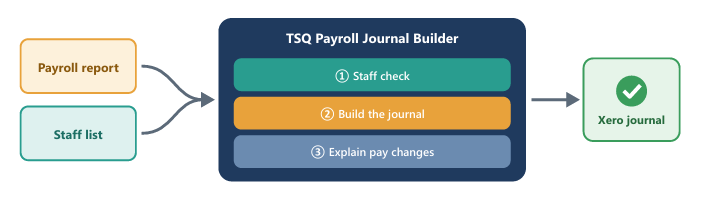
The app then does three things:
1. Check the staff list. Before any numbers are crunched, it compares last month’s staff list with this month’s payroll, person by person. It flags new starters who are being paid but aren’t on the list yet, leavers, anyone marked as left who is still being paid, and anyone who appears to have changed team. It then drafts an updated staff list for a person to review and approve. It suggests; it doesn’t decide.
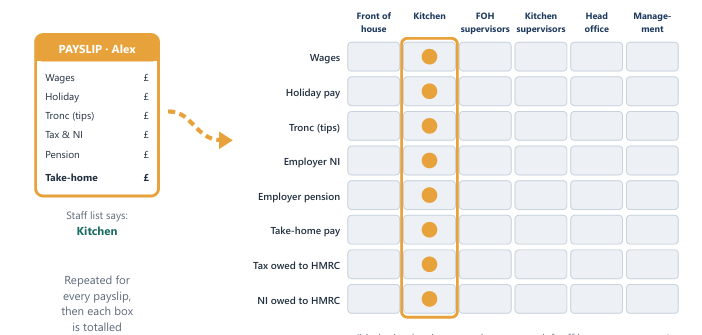
2. Build the journal. Think of a wall of pigeonholes, with the teams across the top and the types of pay cost down the side: wages, holiday pay, tronc, employer NI and employer pension. The app takes each payslip and drops each part of it into the right hole, using the staff list to decide the team. It then totals each box and turns the totals into journal lines: what the business spent, split by team, and what it now owes to staff, HMRC and the pension provider.
Then comes the bean counter test. If debits equal credits, the journal is ready to download in the exact layout Xero expects, along with a summary table (the same view the old pivot table gave) and an audit list showing every payslip and where it went. If it doesn’t balance, the app stops and says so, and names exactly who caused it: someone being paid who isn’t on the staff list, or someone whose team isn’t recognised.
3. Explain pay changes. “Why is my pay different this month?” is the question every payroll team hears. Give the app this month’s and last month’s payroll reports and it flags anyone whose take-home pay has moved by more than £50, then lists the biggest reasons: more tips, extra hours, a tax change, a student loan starting, and so on. Changes under £1 are ignored as noise.
How I built it
This is the part I suspect you’re most interested in. I’m a qualified accountant, not a software developer. I’ve taught myself some programming over the years, but this app was built working with Claude, an AI assistant. Under the bonnet it’s a small Python app, but you don’t need to know what that means to follow the approach, which went roughly like this.
Write down the rules. Before asking AI to build anything, I wrote out in plain English what the spreadsheet did. Which payroll columns are wages, and which are holiday pay. Which account code each cost goes to. That the team list comes from the staff list, not the payroll report. That a payslip with no take-home pay gets skipped. That two payslips in the same month, numbered “36” and “36A”, belong to the same person.
Describe the job, not the code. I didn’t ask for code. I described what I needed: here are two files, here are the rules, I want a journal in Xero’s import format, and I want it to refuse to produce one that doesn’t balance. Claude worked out how to build it, and I tested what came back.
My prompts went like this:
“Here’s a payroll report and a staff list (names changed). Compare them and flag anyone being paid who isn’t on the list. Give me the result as an Excel file I can check.”
“Now that you have the process that allows you to identify starters and leavers, you need to examine the column headers between the first column (“Gross pay” and the last column “Net pay”) and recognise that these are not static columns e.g. You may have an attachment to earnings order this month but not next month so the column headings will change. Your first task is to build a data frame that captures all the totals that I will need based on the departments that the staff work in. I have uploaded the payroll journal template so you can see the control totals that need calculating”
“Now that the data set has been built, I want you to create the csv journal file and populate it with the totals that you think are required. As a check on your work, you need to make sure the total debits and credits balance ”
“The final part of this project is to perform an analysis between this month’s and last month’s payroll and prepare a summary by person that explains why that person’s net pay has differed month on month. ”
The real prompts had more detail but all followed the same shape.
Build it in stages. This is an iteration that you need to do in steps and be prepared to reword the prompt if you have not got the output you want before going to the next stage.
Test it to the penny. This is where the accountant in you earns its keep. I ran a real month through the app and checked the results line by line against that month’s spreadsheet workbook. Only when it matched to the penny did I then load another file. Since the automation runs in less than a second, I tested every payroll file for the past year to make sure I was confident the code was robust.
Keep the rules in one place. Account codes and mappings sit in a single, clearly labelled settings section. If a code changes, it’s updated there, with no hunting through linked formulas.
What tripped me up
The first version assumed gross pay would always be in the same column. The month the payroll export changed shape, it broke. I had to tell it to read the column headings each time rather than assume where things live, the same discipline as never hard coding a cell reference in a lookup.
A word about data
Payroll is personal data, so I built the app using anonymised data: Person A, Person B and so on. The building phase was about structure – tables and lookups, in Excel speak – so the real names were unimportant. The important thing to remember is that I used AI to build the app, but the confidential files are processed by the code on my own computer, not by an AI.
The result
The monthly routine is now five steps: export the payroll, review the staff check, click one button to build the journal, confirm it balances, and import it into Xero.
It paid for itself by the second month; everything after that is pure time saving.
But the bigger win isn’t speed. The classic mistakes (a new starter nobody added, a leaver still being paid, someone in the wrong team) used to slip through quietly, and now they’re flagged loudly. Every number can be traced back to the payslip it came from. And people stay in charge: the app suggests, a person reviews.
Your first step
You don’t need to start with payroll. Pick one journal or report that you rebuild every month from a spreadsheet. Then, before going anywhere near AI, write down every rule that the spreadsheet applies, in plain English, as if you were handing it to a new member of the team. You’ll probably find a rule or two that only lives in your head. That document is your specification, and it’s most of the work.
When you’re ready to start building, work with a dummy or anonymised version of your data, not the real thing.
Up next: a stock reconciliation automation that cross-references stock codes between a warehouse management system and the accounts. I bet you can’t wait.